Hybrid Raffles: Paper and Digital in One Draw

Hybrid raffles solve one of the biggest challenges raffle organisers face: running a raffle that combines both paper and digital tickets efficiently. If you’ve ever struggled with printing thousands of online tickets or managing separate paper and digital draws, RaffleLink 2.0’s hybrid raffle support is built for you.
The challenge we solved
For years, organisations have told us the same story: “Our supporters want paper tickets, but we also need the efficiency of online sales.” The traditional solution was cumbersome:
- Print all digital tickets
- Manually combine them with paper tickets
- Spend hours preparing for the draw
- Risk errors in ticket management
- Deal with frustrated volunteers
Hybrid raffles eliminate these headaches while maintaining the traditional feel of paper tickets that many supporters love.
One raffle, one fair draw
When you enable paper tickets on a RaffleLink 2.0 raffle, digital and paper sales merge into a single, mathematically fair draw. Here’s what makes it work:
1. Setup made simple
- Enable paper tickets alongside your online sales
- Download pre-numbered, pre-filled paper tickets from RaffleLink’s printable templates
- Start selling both formats immediately
2. During the raffle
- Sell paper tickets as usual — take cash, or card with Tap to Pay through the Ticket Booth
- Digital sales happen automatically, around the clock
- Important: retain ALL paper ticket stubs for the draw and your records
- No need to input individual paper ticket details — just record your paper sales totals
3. Drawing winners
You choose how the draw runs — RaffleLink 2.0 supports four draw methods, and paper-enabled raffles pick between two of them:
- Hybrid draw (automatic): your paper sales join the digital pool, and the draw weights every ticket equally — it decides proportionally, at random, whether a paper or digital ticket wins. If a paper ticket wins, you simply draw one stub from your paper batch and record it.
- Combined hat draw (manual): prefer the theatre of a physical draw? Print stubs for your digital sales, combine them with your paper stubs, and draw every prize from one hat — then record the winners back into RaffleLink.
Either way, every ticket has an equal chance, winner details are documented, and your draw records stay verifiable — which matters, because most states set conditions on how a raffle is drawn and recorded. Our compliance overview covers those obligations, and the permit checker will tell you whether your prize pool needs approval before you print a single ticket.
How it works: a practical example
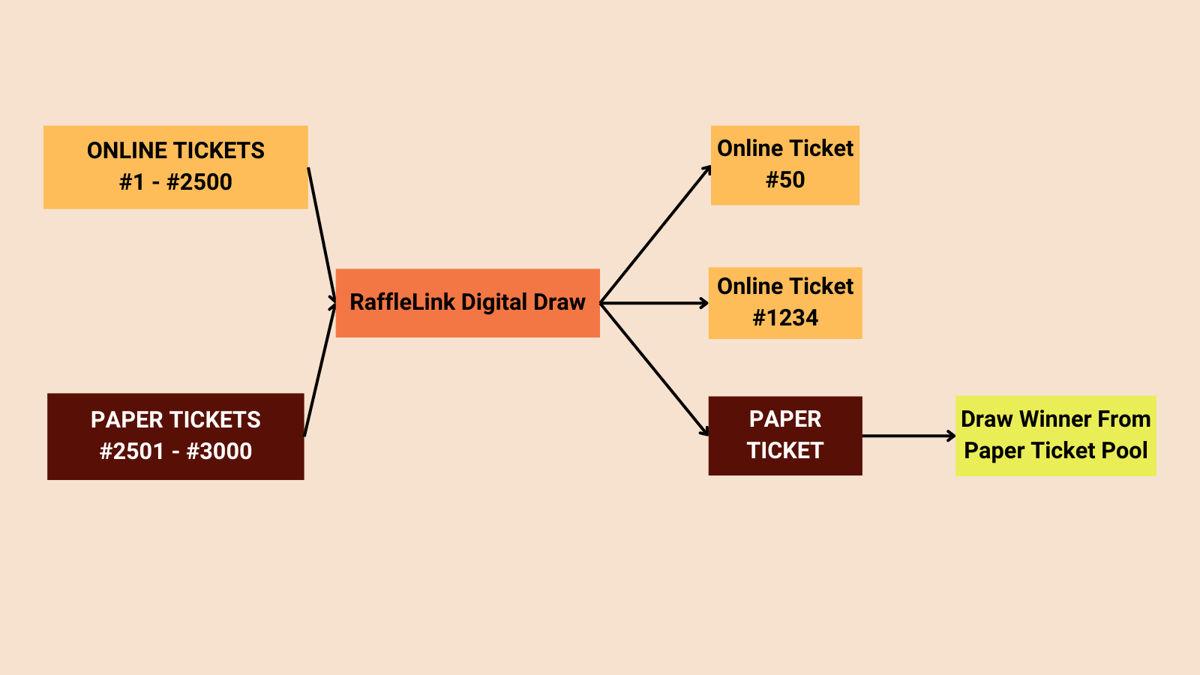
Let’s say you’re running a hybrid draw with 3,000 tickets:
- 2,500 digital tickets (numbers 1–2,500)
- 500 paper tickets (numbers 2,501–3,000)
When someone wins:
- The draw runs fairly across all 3,000 tickets
- If ticket #1,234 wins — great! We have their details digitally
- If ticket #2,600 wins, you simply draw one ticket from your paper batch
- Enter the winning paper ticket number to update your RaffleLink page
- Retain records, then contact winners and coordinate prize collection
Pro tips for success
To make the most of hybrid raffles:
Smart numbering
- Start selling paper tickets from the highest number down
- This gives flexibility to increase online allocation if needed
- Maintain clear sequential numbering
Efficient management
- Use RaffleLink’s pre-printed ticket templates
- Keep paper ticket stubs organised and stored securely during and after the draw
- Record sales totals daily
- Reconcile regularly against your live sales dashboard, which splits online and in-person takings for you
Clear communication
- Inform volunteers about both systems
- Train staff on the process
- Explain options to supporters (card — including Tap to Pay in person — or cash)
- Highlight the convenience factor
If volunteers are selling on your behalf, pair hybrid tickets with team sales tracking so every sale is attributed back to the person who made it.
Getting started today
Ready to run a hybrid raffle?
- Create your next raffle
- Enable paper tickets and set your allocations
- Download your pre-numbered paper tickets
- Start selling!
Our support team is ready to help you set up a hybrid raffle and answer any questions you might have. Get in touch any time.